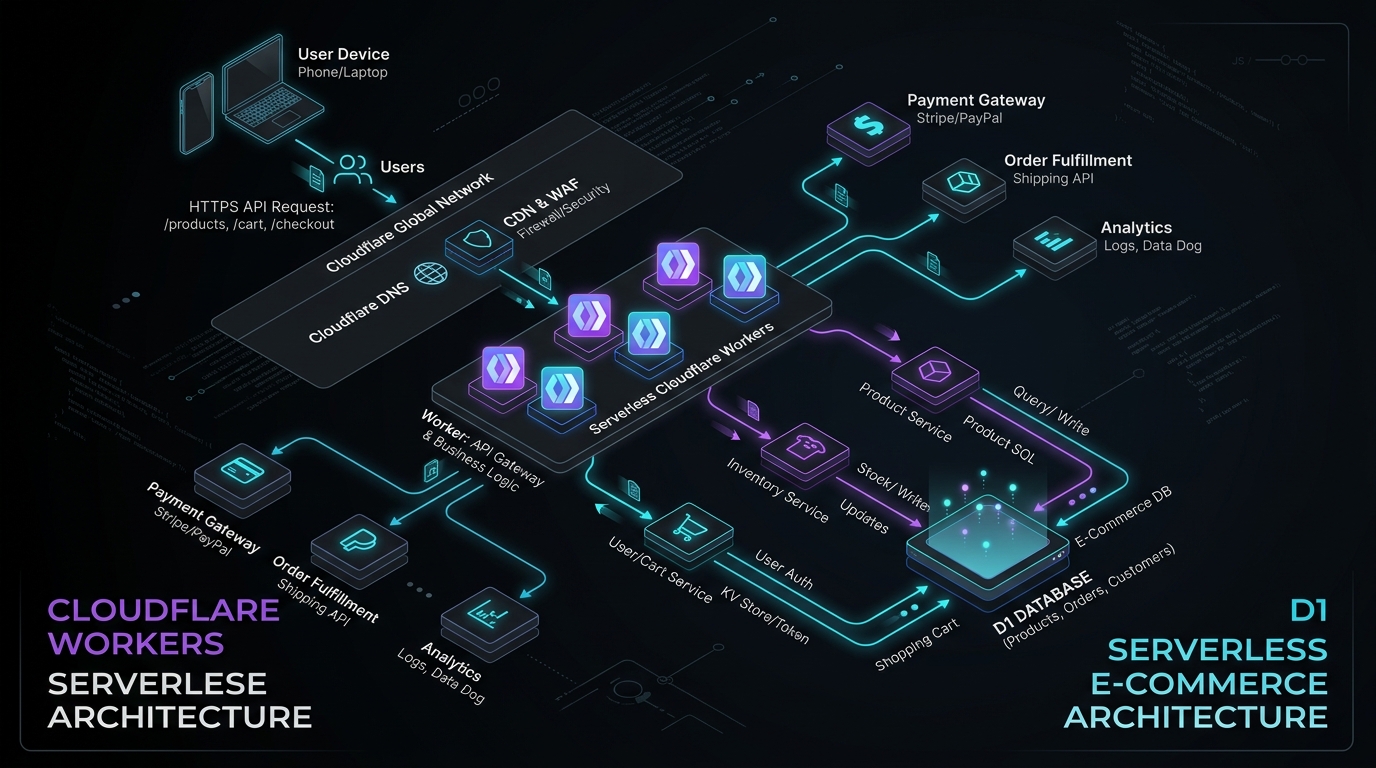
Cloudflare D1 & Workers: Serverless E-Commerce Architecture
Answer-first: A serverless e-commerce architecture pairs Cloudflare Workers with D1 edge SQLite and Durable Objects to deliver sub-15ms global API latency with zero cold starts. Durable Objects act as transactional single-writer actors preventing inventory overselling, while D1 provides globally read-replicated SQL persistence, eliminating dedicated Redis clusters and reducing infrastructure operating costs by up to 85%.
Prerequisite: Familiarity with TypeScript, Cloudflare Workers runtime (workerd), relational SQL schemas, and distributed actor concurrency models.
Running a traditional PHP/MySQL stack for e-commerce works until a flash sale hits. Then you’re scaling servers, tuning Redis, and hoping your monolithic database doesn’t lock up. If you are exploring moving away from Magento or simply evaluating the edge, there is a radically different approach: building a transactional e-commerce engine entirely on Cloudflare’s edge network.
This post breaks down the architecture of a zero-ops, serverless e-commerce backend using Cloudflare Workers, D1 (SQLite), and Durable Objects (for an executive summary of the business benefits, see Zero-DevOps E-Commerce with Cloudflare). We will look at how to structure the database, how to prevent inventory overselling without Redis, and where the limits of this architecture lie.
The “Zero-Ops” E-Commerce Dream
The traditional e-commerce problem is state. Serving static product pages is a solved problem (as discussed in deploying full-stack edge architecture), but the moment a user adds an item to their cart, you need a transactional backend.
Cloudflare’s edge stack shifts this paradigm. Instead of sending users back to a centralized US-East data center for every API call, the API (Workers) and the database read replicas (D1) sit within milliseconds of the user. The latency profile completely changes.
Architecting the Edge-Native E-Commerce Stack
A purely serverless e-commerce setup looks drastically different from traditional microservices vs monoliths.
flowchart TD
    U["User Browser / Mobile App"] --> CF["Cloudflare CDN Edge"]

    CF --> P["Cloudflare Pages - Next.js/Astro"]
    CF --> W["Cloudflare Workers - API Gateway"]

    W --> KV["(KV - Product Cache)"]
    W --> D1["(D1 - Relational Data)"]
    W --> DO{{"Durable Objects - Cart & Locks"}}
    W --> R2["(R2 - Product Images)"]

    DO -.->|"Persists Order"| D1
    W -.->|"Webhook"| Stripe["Stripe API"]
- Cloudflare Pages: Hosts the static storefront (Astro, Next.js).
- KV: Caches product catalogs for instant reads.
- D1: Stores persistent relational data:
users,orders, andproducts. - Durable Objects: Manages the ephemeral, highly concurrent state of the shopping cart and inventory locks.
- R2: Stores heavy assets like product images and downloadable digital goods with zero egress fees.
Designing the D1 Schema with Drizzle ORM
Cloudflare D1 is built on SQLite. It reached General Availability with a strict 10GB limit per database. You cannot build a single massive monolithic database on D1.
Instead, the accepted pattern for B2B SaaS or multi-tenant e-commerce is Database-per-Tenant. Cloudflare allows up to 50,000 databases per account. By using Drizzle ORM, developers can dynamically bind queries to the correct tenant’s D1 instance at runtime. The TypeScript schema definition below establishes strong typing and foreign key constraints across relational entities:
// schema.ts
import { sqliteTable, text, integer } from 'drizzle-orm/sqlite-core';

export const users = sqliteTable('users', {
  id: text('id').primaryKey(),
  email: text('email').notNull().unique(),
  createdAt: integer('created_at', { mode: 'timestamp' })
});

export const products = sqliteTable('products', {
  id: text('id').primaryKey(),
  sku: text('sku').notNull().unique(),
  priceCents: integer('price_cents').notNull(),
  inventoryCount: integer('inventory_count').notNull(),
});

export const orders = sqliteTable('orders', {
  id: text('id').primaryKey(),
  userId: text('user_id').references(() => users.id),
  totalCents: integer('total_cents').notNull(),
  status: text('status').notNull().default('pending'),
});
Because D1 reads are globally replicated but writes go to a single Primary node, order placement will incur network latency (often ~300ms). This is an acceptable trade-off for checkout, but ensure your UI handles loading states gracefully.
Handling Inventory Race Conditions with Durable Objects
The hardest problem in distributed e-commerce is the race condition: two users buying the last ticket to an event at the exact same millisecond.
In AWS, you might use a Redis distributed lock (Redlock) or DynamoDB conditional updates. In Cloudflare, the elegant solution is Durable Objects (DO).
Durable Objects provide strong consistency through a single-threaded execution model. When mapping product inventory to a dedicated Durable Object, all concurrent checkout requests queue up and execute sequentially. The code example below demonstrates how an edge Worker delegates stock decrement requests to a target Durable Object instance:
// Example Worker calling a Durable Object for checkout
export default {
  async fetch(request, env) {
    const { productId, quantity } = await request.json();

    // Route to the unique Durable Object for this specific product
    const id = env.INVENTORY_DO.idFromName(productId);
    const productLock = env.INVENTORY_DO.get(id);

    // This call is guaranteed to be single-threaded at the destination
    const res = await productLock.fetch("http://do/decrement", {
      method: "POST",
      body: JSON.stringify({ quantity })
    });

    if (res.status === 409) return new Response("Out of stock", { status: 409 });
    return new Response("Checkout reserved");
  }
}
You don’t need to write locking logic; the architecture itself provides the mutex.
Payment Processing at the Edge
Integrating payments at the edge has specific constraints. Cloudflare Workers run on V8 isolates, not Node.js. When using the Stripe Node SDK, you must explicitly configure it to use the fetch API, and crucially, use SubtleCrypto to verify webhooks (the Node crypto module is not available). The Worker below wires up exactly that:
import Stripe from 'stripe';

// Initialize with fetch client
const stripe = new Stripe(env.STRIPE_SECRET_KEY, {
  httpClient: Stripe.createFetchHttpClient(),
});

// Verifying Webhooks using Edge-native WebCrypto
const webCrypto = Stripe.createSubtleCryptoProvider();
const event = await stripe.webhooks.constructEventAsync(
  rawRequestBodyString, // MUST be raw text, not parsed JSON
  signatureHeader,
  env.STRIPE_WEBHOOK_SECRET,
  undefined,
  webCrypto
);
Cloudflare D1 Query Optimization & Serverless Limits
Deploying SQLite at the edge via Cloudflare D1 offers a unique execution environment, but it comes with strict resource limits and query characteristics that differ substantially from traditional PostgreSQL or MySQL servers. To build a high-performance storefront, you must understand cold starts, query limits, and optimization techniques tailored for D1.
Cold Starts and Connection Lifecycle
Unlike serverless databases running on traditional VM-based platforms (like AWS Lambda connecting to RDS), Cloudflare Workers run on V8 isolates. Worker cold starts are typically sub-10ms because they do not require spinning up a guest operating system.
However, D1 databases have their own warming behavior:
- Isolate Warmth: When a worker isolate starts, the binding connection to D1 is initialized. The first query against D1 may experience a slight overhead (typically 10-30ms) as the edge node mounts the underlying SQLite database file and compiles the SQL statements.
- Statement Caching: You should define your queries using parameterized prepared statements. Parameterized queries (
SELECT * FROM products WHERE sku = ?) allow D1 to cache the compiled SQL execution plan. Re-compiling raw SQL strings on every request wastes CPU cycles and increases query latency.
D1 Query Limits & Batch Operations
Cloudflare D1 enforces strict limits to ensure tenant isolation across the edge:
- Maximum Execution Time: A single SQL query must execute within 5 seconds.
- Payload Limits: The response size of a single query result is limited to 10MB.
- Row Read and Write Limits: D1 charges and throttles based on the number of rows read and written. A poorly optimized query that scans a table of 100,000 rows to return 10 items will consume 100,000 “row reads,” quickly exhausting your monthly billing quotas and degrading edge performance.
To minimize network round-trips between the Worker isolate and the D1 primary node, leverage D1’s batch querying capabilities:
// Executing batch operations to minimize HTTP round-trips
const stmt1 = env.DB.prepare("INSERT INTO orders (id, user_id, total_cents) VALUES (?, ?, ?)");
const stmt2 = env.DB.prepare("UPDATE products SET inventory_count = inventory_count - ? WHERE id = ?");

const batchResults = await env.DB.batch([
  stmt1.bind(orderId, userId, totalCents),
  stmt2.bind(quantity, productId)
]);
SQLite Query Optimizer Guide for D1
Because D1 runs SQLite under the hood, standard SQLite optimization techniques apply. Here is how to profile and optimize your D1 queries:
1. Analyze with EXPLAIN QUERY PLAN
Prepend EXPLAIN QUERY PLAN to expose table scan operations and reveal missing indexes:
EXPLAIN QUERY PLAN
SELECT p.id, p.sku, o.status
FROM products p
JOIN orders o ON p.id = o.product_id
WHERE o.status = 'pending';
If the output contains SCAN TABLE products, it indicates SQLite is performing a full table scan, checking every single row because a foreign key index is missing. Look for SEARCH TABLE which indicates an index is being utilized.
2. Avoid Column Scanning via Covering Indexes
Covering indexes let SQLite retrieve target columns directly from the index B-Tree without querying the main table:
-- Creating a covering index for fast product lookup by SKU and price
CREATE INDEX idx_products_sku_price ON products(sku, price_cents);
3. Offload Large Columns to R2
SQLite stores data in pages (typically 4096 bytes). If you store large JSON payloads or text descriptions in a D1 cell, a single row can span multiple pages. This increases the number of page reads required to execute a query, even if the large column is not selected.
- Guideline: Store product descriptions, long HTML specs, and image binaries in Cloudflare R2. Keep only the R2 resource URLs and metadata inside D1.
4. The D1 Row-Read Profiler
Inspect statement metadata during local development to check query efficiency:
const { results, meta } = await env.DB.prepare(
  "SELECT * FROM products WHERE inventory_count < ?"
).bind(10).all();

console.log(`Rows read: ${meta.rows_read}`);
console.log(`Rows written: ${meta.rows_written}`);
console.log(`Duration: ${meta.duration}ms`);
If meta.rows_read is significantly larger than results.length, your query is inefficient. Always optimize the query until rows_read matches results.length as closely as possible.
WooCommerce vs Cloudflare: The Trade-offs
While an edge-native serverless architecture offers sub-10ms response times and low operational overhead, it is not a drop-in replacement for traditional platforms like WooCommerce. Engineering teams evaluating this shift must consider key structural trade-offs:
- The Missing Ecosystem: WooCommerce provides thousands of turnkey plugins for shipping carriers (FedEx, UPS), complex tax calculation engines, and localized PDF invoicing. On Cloudflare, these capabilities must be built custom or integrated via third-party REST APIs.
- No Managed Admin Panel: Developing on Workers requires engineering a custom React, Vue, or Astro administrative interface for catalog management and order fulfillment.
- Database Migration Overhead: Adopting a Database-per-Tenant model to bypass D1’s 10GB limit necessitates building automated pipeline tooling to execute schema migrations consistently across thousands of discrete D1 databases.
Architectural Summary & Production Checklist
Building a serverless e-commerce engine on Cloudflare Workers and D1 is a masterclass in modern edge architecture. It eliminates idle server costs, scales infinitely, and solves race conditions natively with Durable Objects.
It is the perfect stack for developer-led B2B SaaS platforms or digital product storefronts. But if you need an out-of-the-box retail store with complex shipping rules, the traditional monolith still holds its ground.