Zero DevOps E-commerce with Cloudflare Workers & Turborepo
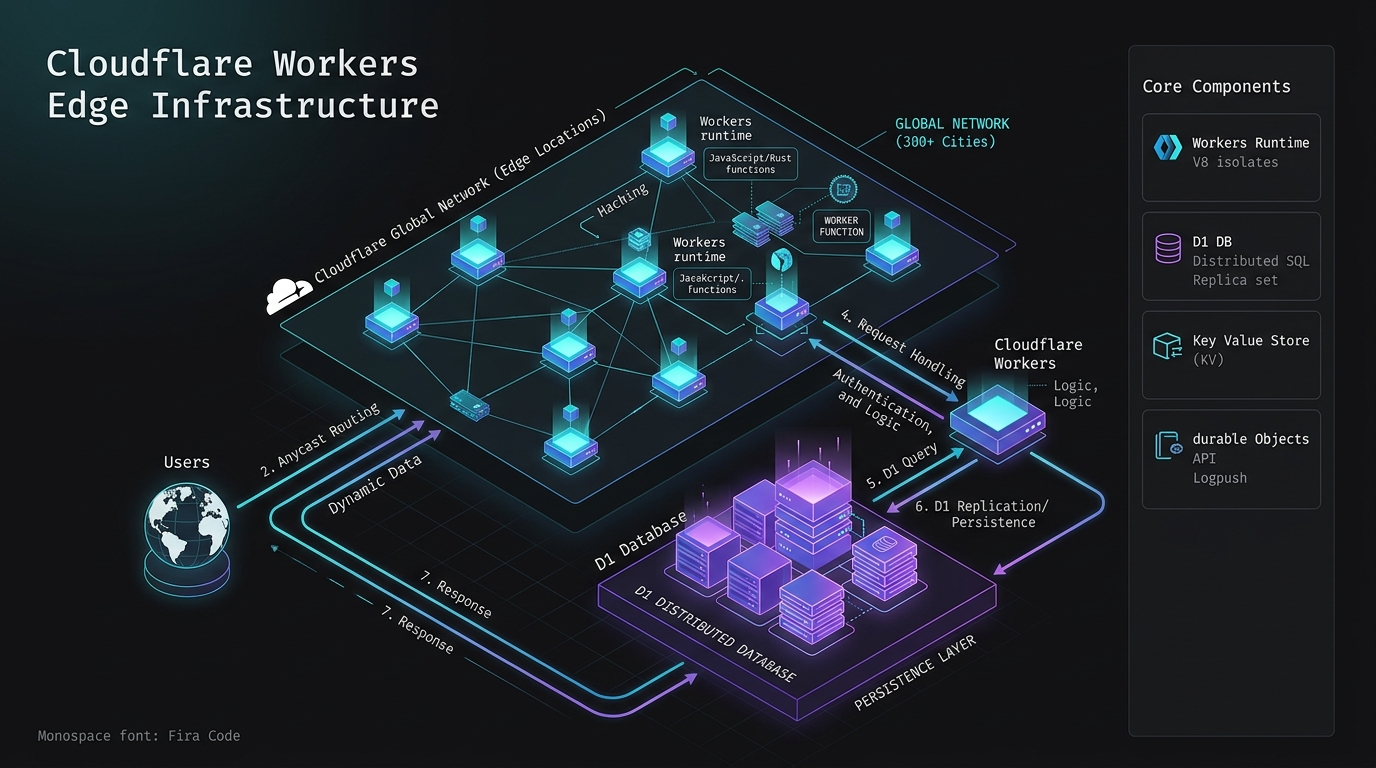
Answer-first: Cloudflare Zero DevOps architecture deploys e-commerce storefronts on edge Workers, D1 SQL, and KV caches, bypassing traditional server provisioning while achieving sub-50ms global response times.
For a stateful edge checkout pattern, pair it with Cloudflare D1 and Durable Objects for real-time carts.
Tired of maintaining expensive Kubernetes clusters, fine-tuning Auto-scaling groups on AWS, or wiring together complex CI/CD pipelines just to keep an e-commerce store alive? Welcome to the Zero DevOps era.
This guide we dissect Aura Store — a production-grade Cloudflare Workers E-commerce platform built entirely on Edge infrastructure, powered by a Turborepo Monorepo. Everything you see below is drawn directly from the running codebase.
1. Turborepo Monorepo Architecture in Practice
Merging an Admin API and a Public API into a single backend is an invitation for privilege escalation bugs. Aura Store keeps them strictly apart across six dedicated monorepo packages:
apps/storefront-ui: Customer-facing storefront (Next.js 15+) — deployed to Cloudflare Pages for Edge rendering.apps/admin-ui: The back-office control panel (Vite/React) — deployed to Pages, strictly protected behind corporate SSO.apps/public-api: Cloudflare Worker that serves product listings, user carts, and handles checkout.apps/admin-api: A separate Cloudflare Worker with strict RBAC middleware. Unreachable from the public internet path.packages/contract: Zod schemas and OpenAPI specs — the single source of truth for all API payloads.packages/database: Drizzle ORM schema and migrations for Cloudflare D1.
Because both apps and packages share the same Turborepo workspace, a schema change in packages/contract or packages/database propagates to all consumers at build time — no manual version bumping required.
Monorepo Pipeline Configuration (turbo.json)
To coordinate tasks across multiple frontend applications, serverless Workers, and shared libraries, the root of the project defines a turbo.json pipeline configuration. This configuration ensures tasks execute in the correct order, caches build artifacts, and avoids redundant compilation.
{
  "$schema": "https://turbo.build/schema.json",
  "globalDependencies": [
    "**/.env.*local"
  ],
  "pipeline": {
    "build": {
      "dependsOn": [
        "^build"
      ],
      "outputs": [
        ".next/**",
        "!.next/cache/**",
        "dist/**",
        "build/**"
      ]
    },
    "lint": {
      "outputs": []
    },
    "test": {
      "dependsOn": [
        "build"
      ],
      "outputs": []
    },
    "deploy": {
      "dependsOn": [
        "build",
        "lint",
        "test"
      ],
      "outputs": []
    }
  }
}
Explaining Turborepo Build Optimization
Turborepo constructs an internal Directed Acyclic Graph (DAG) of project tasks to execute builds concurrently. The configuration key dependsOn: ["^build"] instructs Turborepo that a package’s build task cannot run until all of its internal dependency packages have completed their respective build tasks. For example, the public-api worker depends on the @ecommerce/contract and @ecommerce/database packages; therefore, Turborepo compiles the contracts and databases first.
Artifact Hashing and Caching
Before running any task, Turborepo computes a unique hash based on:
- The contents of all files in the package directory.
- The hashes of all internal dependencies.
- The specified
globalDependencies(like environmental configuration files). - Defined task settings and command-line arguments.
If the computed hash matches a previous run, Turborepo bypasses execution entirely, printing cache hit and replaying the cached stdout and file output artifacts (located in the outputs array) in milliseconds.
Remote Cache Integration
In large e-commerce teams, local cache hits are extended to CI/CD servers via Remote Caching. When a build completes on a developer’s machine or in a GitHub Action, the compiled outputs are uploaded to a centralized, encrypted remote cache. When another developer or the deployment pipeline checks out the branch, Turborepo downloads the pre-built binaries from the remote store, reducing average build times by over 90%.
2. Multi-Environment Wrangler Configuration
Handling relational data, key-value storage, and queue processing at the edge requires careful binding definitions in the Worker configuration. The wrangler.toml file below defines multi-environment overrides for D1 database IDs, KV namespaces, and R2 bucket bindings across staging and production:
name = "public-api-worker"
main = "src/index.ts"
compatibility_date = "2026-06-01"
compatibility_flags = ["nodejs_compat"]

# Global Environment Variables
[vars]
ENVIRONMENT = "production"
API_VERSION = "v1"

# Cloudflare D1 Database Bindings
[[d1_databases]]
binding = "DB"
database_name = "ecommerce-db-prod"
database_id = "f052e46d-34e8-4217-b715-e21544f808db"
migrations_dir = "../../packages/database/migrations"

# Cloudflare KV Namespaces (Product Cache & Session Stores)
[[kv_namespaces]]
binding = "CACHE_KV"
id = "77c8e9b4122d4f3b8956e18dbcfb219e"

# Cloudflare R2 Buckets (Product Images & Attachments)
[[r2_buckets]]
binding = "PRODUCTS_R2"
bucket_name = "aura-storefront-assets-prod"

# Cloudflare Queue Bindings (Async Event Broker)
[[queues.producers]]
queue = "ecommerce-events-prod"
binding = "EVENT_QUEUE"

# -------------------------------------------------------------
# Staging Environment Override
# -------------------------------------------------------------
[env.staging]
name = "public-api-worker-staging"

[env.staging.vars]
ENVIRONMENT = "staging"

[[env.staging.d1_databases]]
binding = "DB"
database_name = "ecommerce-db-staging"
database_id = "d182e46d-55c8-4721-a115-e21544f999cc"
migrations_dir = "../../packages/database/migrations"

[[env.staging.kv_namespaces]]
binding = "CACHE_KV"
id = "22c8e9b4122d4f3b8956e18dbcfb319f"

[[env.staging.r2_buckets]]
binding = "PRODUCTS_R2"
bucket_name = "aura-storefront-assets-staging"

[[env.staging.queues.producers]]
queue = "ecommerce-events-staging"
binding = "EVENT_QUEUE"
Using this configuration, running a deployment is completely hands-off:
- For local development, Wrangler uses local SQLite:
wrangler dev - For staging deploy:
wrangler deploy --env staging - For production deploy:
wrangler deploy
3. Circumventing D1 Concurrency & SQLite Lock Timeouts
Cloudflare D1 is built on SQLite, which means it inherits SQLite’s core database locking behavior: a single writer model.
When thousands of users attempt to write to the database simultaneously during a product drop or flash sale, concurrent transactional writes will trigger SQLITE_BUSY: database is locked errors. This is because SQLite locks the entire database file during write transactions, causing queue congestion.
The Solution: Transaction Batching via the D1 Batch API
To prevent lock timeouts, we must minimize database write roundtrips. Instead of opening multiple transactions sequentially, we combine queries into a single batch using the native db.batch() API. This locks the database exactly once, executes all operations in memory, and writes them in a single file-system operation.
The TypeScript code below processes edge checkout transactions, deducts stock, and inserts order line items within a single atomic batch:
import { drizzle } from "drizzle-orm/d1";
import { eq, sql } from "drizzle-orm";
import { orders, orderItems, inventoryStocks } from "../../packages/database/schema";

export interface Env {
  DB: D1Database;
  EVENT_QUEUE: Queue;
}

interface CheckoutPayload {
  userId: string;
  items: { sku: string; quantity: number; price: number }[];
}

export async function processEdgeCheckout(
  env: Env,
  payload: CheckoutPayload
): Promise<{ success: boolean; orderId?: string; error?: string }> {
  const db = drizzle(env.DB);
  const orderId = crypto.randomUUID();
  const totalAmount = payload.items.reduce((sum, item) => sum + item.price * item.quantity, 0);

  try {
    // 1. Prepare batch statements
    // SQLite locking is mitigated by grouping verification, update, and logging
    const statements: any[] = [];

    // Statement A: Create the core order record
    statements.push(
      db.insert(orders).values({
        id: orderId,
        userId: payload.userId,
        totalAmount: totalAmount,
        status: "PROCESSING",
        createdAt: new Date(),
      })
    );

    // Statements B: Insert order items and deduct stock
    for (const item of payload.items) {
      // Record order line item
      statements.push(
        db.insert(orderItems).values({
          orderId: orderId,
          sku: item.sku,
          quantity: item.quantity,
          unitPrice: item.price,
        })
      );

      // Deduct stock immediately. The WHERE clause prevents stock going negative
      statements.push(
        db
          .update(inventoryStocks)
          .set({
            availableQty: sql`${inventoryStocks.availableQty} - ${item.quantity}`,
            updatedAt: new Date(),
          })
          .where(
            sql`${inventoryStocks.sku} = ${item.sku} AND ${inventoryStocks.availableQty} >= ${item.quantity}`
          )
      );
    }

    // 2. Execute statements in a single batch transaction block
    // D1 guarantees all statements run atomically inside a single BEGIN IMMEDIATE/COMMIT block
    const results = await env.DB.batch(statements);

    // 3. Post-batch validation: Check if stock update succeeded
    // Since SQL UPDATE returns success even if 0 rows matched the WHERE clause,
    // we must verify that rows were actually updated.
    // The index offset matches our batch array order.
    let itemOffset = 2; // Order insert (0) + First Item insert (1) -> Stock update starts at index 2
    for (let i = 0; i < payload.items.length; i++) {
      const updateResult = results[itemOffset];
      if (updateResult.meta.rows_written === 0) {
        // If a row wasn't written, it means availableQty >= item.quantity failed
        throw new Error(`Stock allocation failed for SKU: ${payload.items[i].sku}. Insufficient stock.`);
      }
      itemOffset += 3; // Step past: Item Insert (1) + Next Stock Update (1) + Next Item Insert (1)...
    }

    // 4. Publish background order completion event
    await env.EVENT_QUEUE.send({
      type: "ORDER_CREATED",
      orderId: orderId,
      timestamp: Date.now(),
    });

    return { success: true, orderId: orderId };
  } catch (error: any) {
    console.error("Checkout batch failed:", error.message);
    return { success: false, error: error.message || "Unknown error during checkout." };
  }
}
3b. Edge Caching Strategy and Routing Configuration
In an e-commerce platform, serving product lists and details with sub-100ms latency globally requires aggressive edge caching. Cloudflare Workers allow developers to intercept fetch requests and interact programmatically with the globally distributed Cloudflare Cache API, bypassing database calls entirely for hot static routes.
The TypeScript script below shows the routing and edge caching handler in Aura Store’s public-api worker:
// apps/public-api/src/caching.ts - Edge Caching & Routing Handler
export async function handleRequest(request: Request, env: any, ctx: any): Promise<Response> {
  const url = new URL(request.url);
  const cache = caches.default;

  // 1. Bypass cache for non-GET requests, carts, checkout, and admin paths
  const isCacheablePath =
    url.pathname.startsWith('/api/v1/products') ||
    url.pathname.startsWith('/api/v1/catalog');

  if (request.method !== 'GET' || !isCacheablePath) {
    return fetch(request);
  }

  // 2. Check if the response exists in the edge node's local cache
  let response = await cache.match(request);
  if (response) {
    // Clone response to append diagnostic header
    const headers = new Headers(response.headers);
    headers.set('X-Cache-Status', 'HIT-EDGE');
    return new Response(response.body, {
      status: response.status,
      statusText: response.statusText,
      headers: headers
    });
  }

  // 3. Cache Miss: Query the origin (D1 database or external microservice)
  response = await fetch(request);

  // 4. Cache only successful responses (HTTP 200 OK)
  if (response.status === 200) {
    const headers = new Headers(response.headers);

    // s-maxage=3600: Cache on the Cloudflare edge PoP for 1 hour
    // max-age=60: Instruct client browser to cache for 60 seconds
    // stale-while-revalidate=600: Serve stale cache for up to 10 minutes while updating
    headers.set('Cache-Control', 'public, max-age=60, s-maxage=3600, stale-while-revalidate=600');
    headers.set('X-Cache-Status', 'MISS-EDGE');

    const cacheableResponse = new Response(response.body, {
      status: response.status,
      statusText: response.statusText,
      headers: headers
    });

    // Write to cache asynchronously without blocking the client response
    ctx.waitUntil(cache.put(request, cacheableResponse.clone()));

    return cacheableResponse;
  }

  return response;
}
In-Depth Edge Caching Architecture
The caching strategy relies on several advanced characteristics of the Cloudflare network:
V8 Isolate-Level Routing
Traditional CDNs evaluate caching rules using static configuration policies (like Page Rules). By using Cloudflare Workers, we evaluate caching logic programmatically within the V8 isolate itself. This gives us the flexibility to write custom headers, dynamic bypass rules (e.g., bypassing cache if specific authentication cookies are present), and query-parameter normalization (e.g., sorting URL query keys alphabetically to prevent cache-key fragmentation).
The Role of stale-while-revalidate
The stale-while-revalidate=600 directive is essential for maintaining sub-10ms latency. If a product details page has expired from the edge cache but is still within the 10-minute revalidation window, the edge node serves the stale cached response immediately. Simultaneously, it fires an asynchronous subrequest to the D1 database to pull the fresh data and update the cache. This eliminates “cache stampedes” where a sudden traffic spike to an expired item overloads the database, since only the first request triggers revalidation.
Cache Invalidation and KV Storage
Because the Cache API is node-local (meaning a cache entry on a London node does not exist on a Tokyo node), we cannot easily run a global “purge cache” command programmatically. For critical updates that must propagate instantly (like inventory depletion), we combine the Cache API with Cloudflare KV. The worker stores a version token or last-modified timestamp in KV under a global key. When verifying requests, the worker fetches this token and appends it as a cache-key modifier. When a merchant updates product details, the Admin API changes the global token in KV. Downstream workers see the new token, causing a cache mismatch and forcing a fresh fetch, invalidating the old cache globally in sub-seconds.
4. Automated Mobile SDK Generation
This is the sharpest edge of Aura Store’s architecture. API contracts are defined once as Zod schemas in packages/contract. The GitHub Actions workflow YAML below automatically generates Dart and Swift client SDKs whenever contract definitions change and opens a pull request with the updated bindings:
# Source: .github/workflows/openapi-sdk.yml
- name: Generate OpenAPI JSON Spec
  run: pnpm --filter @ecommerce/contract build:openapi

- name: Generate Dart SDK (Flutter)
  run: |
    openapi-generator-cli generate \
      -i ./packages/contract/openapi.json \
      -g dart \
      -o ./sdks/dart \
      --additional-properties=pubName=aura_api_sdk,pubVersion=1.0.0

- name: Generate Swift SDK (iOS)
  run: |
    openapi-generator-cli generate \
      -i ./packages/contract/openapi.json \
      -g swift5 \
      -o ./sdks/swift \
      --additional-properties=projectName=AuraApiSDK

- name: Create Pull Request
  uses: peter-evans/create-pull-request@v6
  with:
    commit-message: 'chore: auto-generate API SDKs from latest contracts'
    branch: 'auto/sdk-update'
The pipeline opens a PR with the regenerated SDKs. Mobile teams merge it and ship — no reading changelogs, no manually diffing JSON payloads, no type mismatch bugs at runtime.
5. Zero DevOps Deployment: No CI/CD Pipelines to Maintain
Each app in the Turborepo maps to a separate Cloudflare project:
| App | Cloudflare Product | Build Command |
|---|---|---|
storefront-ui (Next.js) | Pages | pnpm run build --filter @ecommerce/storefront-ui |
admin-ui (Vite) | Pages | pnpm run build --filter @ecommerce/admin-ui |
public-api | Workers | Reads apps/public-api/wrangler.toml automatically |
admin-api | Workers | Reads apps/admin-api/wrangler.toml automatically |
Secrets are managed without .env files in CI. Set them once via the Wrangler CLI:
wrangler secret put STRIPE_WEBHOOK_SECRET
wrangler secret put JWT_SECRET
For local Stripe Webhook testing, forward events to the running Worker dev server:
stripe listen --forward-to localhost:8787/api/webhooks/stripe
The Stripe CLI prints a STRIPE_WEBHOOK_SECRET value; paste it into apps/public-api/.dev.vars. The dev environment mirrors production exactly — same code path, same Worker runtime, same D1 schema.
Frequently Asked Questions
What defines a Zero DevOps edge serverless architecture for modern e-commerce platforms?
Answer: A Zero DevOps edge serverless architecture eliminates traditional infrastructure operations—such as OS patching, container orchestration, virtual machine provisioning, and auto-scaling group tuning—by executing application logic inside lightweight V8 isolates across a globally distributed edge network (300+ PoPs). Instead of deploying complex CI/CD infrastructure and Docker containers, developers write TypeScript handlers that Wrangler deploys instantly to edge nodes, while platform features automatically handle DDoS mitigation, TLS termination, global routing, and automatic scaling.
What specific latency benefits do Cloudflare D1 and KV bring to high-concurrency e-commerce workloads?
Answer: Cloudflare D1 provides serverless edge relational database capabilities powered by SQLite, allowing read queries to execute locally at edge Point-of-Presence (PoP) locations with single-digit millisecond response times (<10ms) compared to multi-region database roundtrips that add 100ms+ of latency. Cloudflare KV serves as a globally distributed key-value store optimized for high-read throughput, enabling product catalogs, session configurations, and asset version tokens to be cached and served directly from edge V8 memory with sub-millisecond read latencies.
How does global edge data synchronization work across Cloudflare’s distributed edge nodes without creating stale data conflicts?
Answer: Global edge data synchronization leverages Cloudflare D1’s read replication network alongside Event Queue streams and KV storage versioning to propagate changes across 300+ edge locations. D1 handles primary transactional writes via atomic db.batch() operations, while read replicas asynchronously sync changes globally to provide ultra-low latency reads. For critical updates like inventory depletion or price updates, edge workers append global version hashes to KV cache keys, ensuring downstream edge nodes invalidate stale local cache entries and fetch fresh state in sub-seconds.
Related Reading
- Serverless E-Commerce: Cloudflare Workers & D1 Architecture — the storefront and payment layer on the same stack.
- Cloudflare D1 & Durable Objects: Build Real-Time Cart — stateful cart sessions with Durable Objects.
- Deploy Astro on Cloudflare Pages: Full-Stack Edge Guide — shipping the frontend to the same edge network.
Explore by Category
- Architecture — every in-depth article I have published on this topic.